How to install an external monitor for a hidden inverter? This question matters when an inverter sits inside a cabinet, under a seat, or behind fixed equipment. A concealed unit may operate normally, yet its display remains difficult to read. External monitoring brings voltage, current, battery state, temperature, and fault information into view. It also reduces unnecessary access to crowded wiring spaces.
Mike Sokol, an RV electrical-safety educator, stresses, “Never assume a circuit is dead; verify it with a meter.” That principle belongs at the center of this installation. Before choosing a monitor, identify the inverter’s communication port, supported protocol, and maximum cable length. Some systems use a remote panel. Others require a shunt, Bluetooth module, RS485 adapter, or manufacturer-specific cable. Compatibility is not optional.
The installation should begin with a documented shutdown procedure. Disconnect charging sources, isolate the battery, and confirm zero voltage where appropriate. Route the communication cable away from high-current conductors. Protect it inside flexible conduit near sharp metal edges. Mount the monitor where its screen is visible, dry, and easy to reach. A nearby fuse may be required for the monitor supply, depending on the manufacturer’s instructions.
Small details matter. Label both cable ends. Record the original settings. Test readings against a trusted multimeter after startup. If battery percentages look wrong, the shunt direction or capacity setting may need correction. This is where installation guides can become less perfect than expected. A monitor shows data, but it does not automatically guarantee accurate data. Careful verification makes the hidden inverter easier and safer to manage.
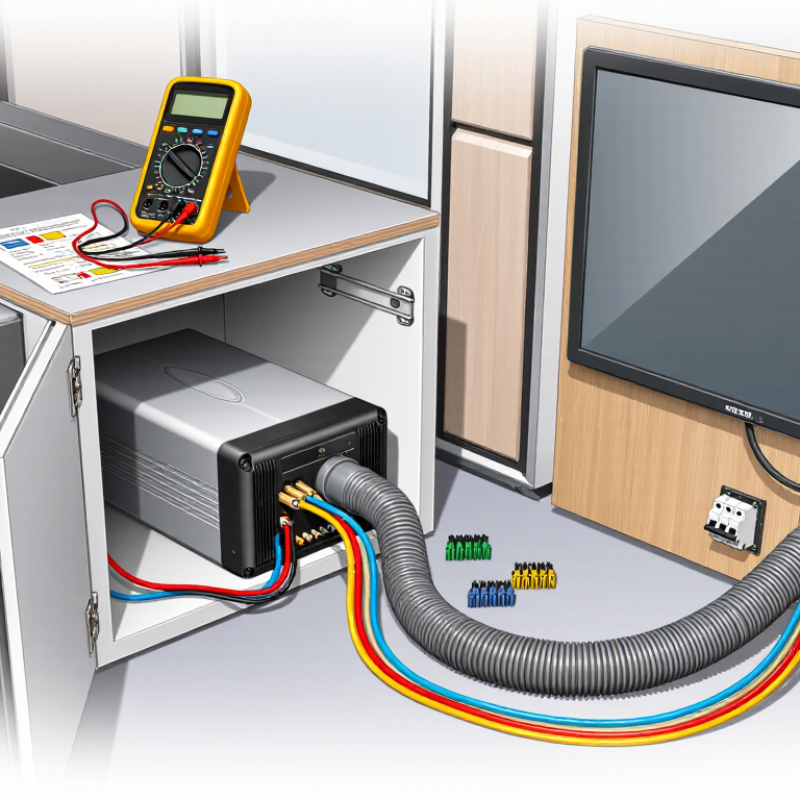
A hidden inverter still needs safe, readable status information. Before installing an external monitor, record the inverter’s continuous output, surge rating, DC input range, and grounding method. Check the enclosure’s temperature limits, ventilation requirements, and required service clearance. A monitor cannot correct an overloaded inverter.
Read the inverter and monitor manuals together. A matching connector does not guarantee communication. Confirm the protocol, voltage levels, baud rate, addressing, register map, and cable length. Some systems use RS-485; others use CAN or Ethernet. Termination resistors and shield grounding may also matter. Test communication before closing the wall or cabinet.
NEC 110.3(B) requires listed equipment to be installed and used according to its instructions, where the NEC applies. That includes approved wiring methods, conductor sizes, disconnect access, and specified monitor connections. Do not splice communication wiring into power conductors without clear instructions. Keep low-voltage cables separated and protected from sharp metal edges.
A qualified electrician should verify the final installation and local requirements. I have seen otherwise neat installations fail because the monitor used the wrong protocol. The display worked, but the readings were unreliable. That mistake is easy to miss. Photograph terminal labels, save configuration settings, and test alarms under controlled conditions. Hidden equipment deserves visible evidence of correct operation.
When an inverter is hidden inside a cabinet, an external monitor needs a dependable communication path. RS-485 is often practical because it supports long, balanced-cable runs. The TIA-485-A standard describes a multipoint bus with up to 32 unit loads on one segment. Industry guidance commonly lists 1,200 m as the maximum reach at lower communication speeds. Distance depends on cable quality, baud rate, grounding, and electrical noise.
Use a twisted, shielded pair rated for balanced data. Route it away from switching cables and inverter output conductors. Install a 120-ohm termination resistor at both physical ends of the bus, not at every device. The Modbus over Serial Line Specification also recommends a linear topology, with short drop cables. Keep the monitor’s branch short. Very short.
Before closing the cabinet, measure continuity and confirm A/B polarity. Then test communication at a slower rate before increasing speed. In field installations, a 32-unit-load limit is easy to misunderstand; newer transceivers may present fractional loads, but the whole network still needs engineering review. Do not assume the 1,200 m figure works in a noisy plant. It may not. Record cable length, node count, termination locations, and error counts during commissioning. A failed test can reveal poor shielding, duplicate addresses, or an overlooked ground potential. That reflection is useful, because hidden equipment makes visual troubleshooting harder.
A hidden inverter can keep a room tidy, but its external monitor needs careful cable planning. Measure the complete cable path, including vertical drops, bends, and service loops. For the monitor power circuit, calculate voltage loss at maximum operating current. Keep the total drop below 3 percent. Remember that the distance usually includes the outgoing and returning conductors. A longer route may require a larger conductor, even when the monitor uses little power.
Protect the cable where it passes through walls, cabinets, or metal panels. Use smooth bushings, suitable glands, and firm strain relief. An IP65 enclosure is dust-tight and resists low-pressure water jets, but it is not designed for immersion. Mount the monitor away from direct spray, then create a small downward drip loop before the cable enters the enclosure. Seal unused openings properly. One overlooked gap can defeat the target.
Tips: Label both cable ends before hiding them. Leave a modest service loop behind the monitor. Check the cable’s bend radius, polarity, and terminal tightness. Test voltage at the monitor while the inverter operates under its heaviest expected load. I have found that a route looking short on paper becomes much longer after cabinet access is considered. Recheck the measurement before cutting. A neat installation is useful, but easy future inspection matters more.
| Planning Dimension | Recommended Design Target | Example Data or Calculation | Installation Guidance | Verification Method |
|---|---|---|---|---|
| Electrical Design and Voltage-Drop Control | ||||
| System voltage | Confirm the inverter control or monitoring supply voltage before selecting the cable. | Typical low-voltage control circuits may use 5 V DC, 12 V DC, or 24 V DC. The monitor input must be compatible with the actual output. | Record the measured voltage at the inverter terminals and at the monitor connection point. | Use a calibrated multimeter with the inverter operating under normal load. |
| Maximum cable run | Measure the complete circuit length, including the outgoing and return conductors. | A 6 m physical route for a two-conductor circuit creates approximately 12 m of electrical loop length. | Follow the planned route around panels, bends, glands, and service loops rather than measuring in a straight line. | Compare the final installed length with the cable schedule before termination. |
| Voltage-drop limit | Keep the calculated voltage drop at or below 3% of nominal voltage. | At 12 V DC: 12 V × 3% = 0.36 V maximum allowable drop. At 24 V DC: 24 V × 3% = 0.72 V. | Use the lowest expected operating voltage and the highest continuous current for a conservative design. | Calculate the drop using: Vdrop = I × R, then calculate percentage drop as Vdrop ÷ Vnominal × 100. |
| Example cable sizing | Select a conductor size that satisfies both voltage-drop and allowable-current requirements. | For a 12 V, 1 A monitor circuit with a 12 m copper loop, 0.75 mm² copper has an approximate loop resistance of 0.28 Ω and a drop of about 0.28 V, or 2.3%. | The example assumes copper conductors near 20°C. Longer runs, higher temperatures, or bundled cables may require a larger conductor. | Recalculate using the actual cable resistance stated on the cable datasheet. |
| Conductor material | Use stranded copper cable suitable for the voltage, temperature, flexing, and installation environment. | Common control-cable sizes include 0.5 mm², 0.75 mm², 1.0 mm², and 1.5 mm². | Avoid selecting solely by current rating; a small control load can still exceed the 3% voltage-drop target on a long route. | Check conductor size, insulation rating, and resistance per metre against the cable marking or datasheet. |
| Protection at the source | Protect the monitor branch circuit with a fuse or circuit protection device rated for the cable and load. | A low-current monitoring circuit may require a small protective device, but the final rating must match the inverter output and cable specification. | Install protection as close as practical to the power source so the entire downstream cable is protected. | Verify polarity, protective-device rating, and disconnect functionality before connecting the monitor. |
| Cable Routing for a Hidden Inverter | ||||
| Route separation | Keep monitor and communication cables separated from high-current DC cables and AC output conductors where practical. | Use a separate conduit or cable channel when the route passes near switching, motor, or high-current wiring. | Cross unavoidable power cables at approximately 90 degrees and avoid long parallel runs. | Inspect the route and check the monitor for intermittent readings or communication errors during inverter operation. |
| Mechanical protection | Protect cables from abrasion, sharp edges, heat, vibration, and compression. | Use grommets at metal penetrations, flexible conduit at moving sections, and cable clamps at regular intervals. | Do not allow the cable to hang from the monitor terminals or rest against hot inverter surfaces. | Perform a visual inspection and a gentle pull test after securing the route. |
| Bend radius | Respect the minimum bend radius specified by the cable manufacturer. | When no value is available, avoid tight bends and leave a smooth service loop rather than forcing the cable around a sharp corner. | Keep bends gradual near glands and terminal blocks to prevent conductor and seal damage. | Check that the outer jacket is not flattened, kinked, or twisted. |
| Service loop | Leave enough spare cable for inspection and future terminal replacement. | A practical service loop is commonly about 150–300 mm, subject to enclosure size and local installation rules. | Do not coil excess cable tightly beside the inverter or place it where it can obstruct cooling airflow. | Confirm that the monitor can be removed without pulling on the fixed cable route. |
| Labeling | Label both ends of every conductor and identify polarity or signal function. | Use labels such as MONITOR +, MONITOR −, DATA A, and DATA B where applicable. | Use durable, legible labels that remain readable at the inverter and monitor after installation. | Compare each label with the wiring schedule and perform a continuity test with power isolated. |
| IP65 Protection and Enclosure Details | ||||
| IP65 target | Use an enclosure or monitor assembly rated IP65 where protection from dust and water jets is required. | IP6X indicates dust-tight protection. IPX5 indicates protection against water jets from any direction under standardized test conditions. | IP65 protection depends on the complete installed assembly, including the cover, gasket, cable glands, plugs, and mounting surface. | Check the product documentation and inspect the assembled enclosure for gaps, damaged seals, or unused open entries. |
| Cable glands | Use glands matched to the cable outer diameter and the enclosure material. | A gland designed for a 6–8 mm cable should not be used with a cable outside that range because the seal may not compress correctly. | Tighten according to the gland manufacturer’s instructions; do not overtighten and deform the seal. | Confirm that the cable cannot rotate or slide through the gland and that the seal is evenly compressed. |
| Unused entries | Close every unused knockout, port, and conduit opening with a suitable IP-rated blanking plug. | One unsealed opening can compromise the enclosure’s dust and water protection. | Install blanking plugs before energizing the system, especially when the enclosure is mounted outdoors or in a damp area. | Inspect the enclosure from all sides and confirm that no opening remains unsealed. |
| Mounting orientation | Mount the monitor and enclosure according to the manufacturer’s permitted orientation. | Use a downward-facing cable entry or a drip loop where appropriate to reduce the chance of water tracking along the cable. | Avoid locations exposed to direct spray, standing water, excessive heat, or blocked ventilation. | After installation, check that water cannot collect around the display, gasket, or cable entry. |
| Gasket condition | Keep the enclosure gasket clean, continuous, and correctly seated. | A compressed or cut gasket can reduce the enclosure’s protection even when the enclosure itself carries an IP65 rating. | Do not use sealant as a substitute for a missing or damaged gasket unless the enclosure instructions specifically permit it. | Open and close the enclosure once before commissioning to confirm uniform gasket contact. |
| Commissioning and Acceptance Tests | ||||
| Polarity and continuity | Verify wiring with the power isolated before applying voltage. | Confirm positive, negative, and communication conductors against the wiring diagram. | Use a continuity tester only on circuits that are disconnected from energized equipment. | Record the test result and correct any reversed or shorted conductors before energizing. |
| Operating voltage at monitor | Confirm that the monitor receives its required voltage while the inverter is operating. | Measure at the monitor terminals, not only at the hidden inverter terminals, because the difference reveals cable loss. | Test under the highest expected continuous load and again under the lowest expected supply condition. | Confirm that measured loss remains within the 3% design target. |
| IP65 inspection | Complete a visual enclosure and cable-entry inspection before exposure to moisture. | Check cover screws, gasket seating, cable-gland compression, blanking plugs, and cable jacket condition. | Do not drill or modify the enclosure after the IP rating has been established unless the modification is properly sealed. | Document photographs, cable-route length, conductor size, measured voltage, and final test results. |
Design note: The cable-sizing example is an engineering illustration based on approximate copper resistance at 20°C. Final selection must use the actual cable datasheet, ambient temperature, installation method, applicable electrical code, inverter documentation, and the requirements of a qualified installer.
Installing an external monitor for a hidden inverter starts with a reliable communication cable. Use shielded twisted pair with a characteristic impedance close to 120 ohms. The twisted conductors reduce electromagnetic noise, especially near power cables and switching equipment.
Power down the inverter and verify the terminals with a meter before wiring. Route the pair away from AC conductors, sharp metal edges, and hot surfaces. Keep the cable continuous where possible. Connect each conductor to the matching communication terminal, then secure the shield according to the inverter’s wiring instructions. In many installations, grounding the shield at one control end helps prevent ground-loop noise. Do not guess.
Termination matters. Install a 120-ohm resistor across the communication pair at each physical end of the bus. Do not place one at every monitor or inverter. With power removed, measure across the pair; two parallel 120-ohm resistors usually read about 60 ohms. A very different reading suggests missing termination, a short, or an incorrect connection.
Leave a small service loop behind the external monitor. It makes later testing less frustrating. Check polarity twice. A reversed pair can look like a dead monitor. One practical mistake is routing the cable neatly beside an inverter output cable; neatness is not isolation. If readings remain unstable, inspect shield bonding, termination placement, and connector pressure before replacing the monitor. Some systems require different grounding or termination rules, so the installation manual remains the final authority.
How to Install an External Monitor for a Hidden Inverter
Commissioning starts with visibility. Mount the external monitor where technicians can read it without opening the inverter enclosure. Use shielded communication cable, secure the terminals, and label every conductor. Confirm the monitor’s voltage, current, and temperature ranges before energizing the circuit. A loose current transformer can create convincing but false readings.
Record baseline values at no load, partial load, and normal operating output. Compare voltage and current with calibrated handheld instruments. Then check power, energy, frequency, and status alarms. IEC 61724-1 emphasizes defined measurement accuracy and consistent data intervals for photovoltaic performance monitoring. The U.S. Department of Energy also identifies data quality as essential for detecting performance losses. Do not accept a single matching number as proof. Check readings across several operating conditions and repeat the test after thermal stabilization.
A practical tolerance sheet should include the monitor specification, instrument uncertainty, wiring losses, and the manufacturer’s permitted deviation. If active power differs by 3%, investigate before changing settings. That difference may come from sampling time, phase alignment, or sensor placement. I once treated a stable display as reliable; later, a reversed sensor direction exposed the mistake. Commissioning needs skepticism, not confidence alone.
Tips: Photograph terminal positions before energizing. Compare timestamps between the monitor and the inverter log. Record ambient temperature and irradiance when available. Use a signed commissioning form, and flag unexplained deviations for review. Do not hide imperfect results; unexplained data weakens future maintenance decisions.
Measured deviation from nominal values compared with configured manufacturer acceptance tolerances
All readings remain within the defined commissioning limits: DC input voltage is 0.53% above nominal, AC output voltage is 0.43% below nominal, frequency is 0.04% below nominal, and output power is 2.8% below nominal. The system can be accepted when protective functions, grounding, and load behavior are also verified.
It can reach about 1,200 meters at lower communication speeds. Actual distance depends on cable quality, noise, grounding, and baud rate. Do not trust the maximum blindly.
A standard segment supports up to 32 unit loads. Newer transceivers may use fractional loads. The complete network still requires engineering review.
Use a shielded twisted pair designed for balanced data. Keep it away from switching cables and inverter output conductors. A neat route can still be electrically poor.
Place one 120-ohm resistor across the pair at each physical bus end. Do not install resistors at every device. Two correct resistors usually measure about 60 ohms together.
Power down the inverter first. Verify terminals with a meter. Confirm continuity, polarity, shielding, and terminal tightness. Check polarity twice.
Measure vertical drops, bends, and service loops. Use smooth bushings, suitable glands, and strain relief. Avoid sharp edges, hot surfaces, and power conductors.
Calculate voltage drop at maximum expected current. Keep total loss below 3 percent. Include both outgoing and returning conductors. A longer route may need thicker conductors.
IP65 protects against dust and low-pressure water jets. It does not permit immersion. Use a downward drip loop and seal unused openings carefully. One small gap matters.
Test at a slower communication rate before increasing speed. Record cable length, node count, termination locations, and error counts. Failed tests can reveal shielding, addressing, grounding, or connection problems.
How to install an external monitor for a hidden inverter? Begin by confirming the inverter’s voltage, current, communication, and environmental ratings, then verify that the selected monitor uses a compatible protocol. Check the installation requirements against NEC 110.3(B) and the manufacturer’s instructions before making any connections. For longer runs, RS-485 can support distances of up to 1,200 meters and as many as 32 unit loads when the network is properly designed.
Plan the cable route to limit interference, maintain the 3% voltage-drop target where applicable, and preserve IP65 protection at entry points and enclosures. Use shielded twisted-pair cable, connect the communication conductors with correct polarity, and install a 120-ohm termination resistor at the appropriate network endpoint. After powering the system, commission it carefully by checking communication status, displayed voltage, current, and alarms. Compare the monitor’s readings with the inverter’s documented tolerances, correct any addressing or wiring errors, and record the final configuration for future maintenance.

NovaVolt Service